Step 4 of 4
Running the Bombe
The menu is the wiring plan. The Bombe uses it to scan all 17,576 drum positions — starting from the selected drum order and automatically cycling through all 60 possible drum orders until a stop is found or every combination has been checked.
What the Menu Gave You
The menu is a graph of letter-pair relationships derived from one valid crib alignment. Each edge in the graph corresponds to a physical cable connection inside the Bombe:
Graph edge = Bombe cable
A menu edge "A–B at position 7" means: the Enigma scrambler at position 7 connects Bombe drums wired to letter-node A and letter-node B. One drum is used per edge.
12 connections max
The simulation uses up to 12 drum banks (connections), matching the typical Bombe configuration at Bletchley Park. The optimizer selects the 12 most useful edges — prioritising those that form the strongest loop.
How the Bombe Worked
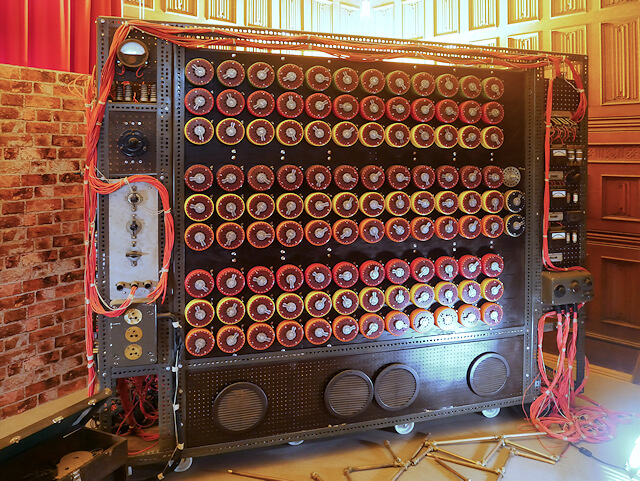
Turing's insight: at each candidate drum position, the menu wiring creates a closed electrical network. The Bombe tests whether that network is self-consistent:
Advance drums — step to the next of 17,576 positions (same mechanical stepping as Enigma).
Set scramblers — each drum bank is set to the drum position corresponding to its crib offset (offset + current position).
Inject voltage — assume the test letter is active. Set its wire live and propagate through all menu edges.
Check contradiction — if all 26 wires become live → contradiction → position wrong, move on. If only some wires are active → stop.
A stop means the Bombe found no contradiction at that position. It's a candidate — not necessarily the correct key, but worth investigating. On average, a well-configured Bombe with a good menu produces 0–6 stops per full scan of 17,576 positions.
The Diagonal Board (Welchman's Enhancement)
Gordon Welchman realized that plugboard symmetry provides free extra information: if A↔F, then F↔A must also hold. The diagonal board is a physical circuit that enforces this across all 26 letter pairs simultaneously.
When the Bombe learns that, say, letter M is live (possibly paired with the test letter), the diagonal board immediately also activates the wire for M's partner — doubling the propagation at no extra cost.
Why it matters
Without the diagonal board, most positions produce at most 1–2 propagation steps before stopping. With it, propagation cascades through the network until it either resolves consistently or produces a contradiction.
Welchman's enhancement reduced false stops by approximately 97%, making the Bombe operationally practical.
The ZZZ Assumption (Ring Settings)
The historical Bombe and this simulation both assume ring settings of 1/1/1. This means the Bombe finds rotor core positions — the internal wiring offsets — rather than the exact window letters the Enigma operator set.
If you set ring settings ≠ 1 on the Enigma page, the turnover notch positions shift. The Bombe models a different stepping sequence, and the connection positions in the menu no longer match the actual rotor permutations. The result is 0 stops.
This is historically accurate: Bletchley analysts resolved ring settings separately after finding a valid stop, by observing the point at which the middle rotor turned over in traffic. Keep ring settings at 1/1/1 on the Enigma page to follow the same workflow.
Bombe UI Walkthrough
Drum order selection (top-right)
Choose the three drum types (Slow / Medium / Fast) matching the Enigma rotor types used to encrypt. The simulation starts with the selected drum order and automatically tries all 60 possible drum orders (5×4×3) until a stop is found or all combinations are exhausted. Unlike the real Bombe — where operators had to physically swap drums or run the same menu on separate Bombe machines configured with a different drum combination — this simulation handles all orders automatically.
Drum configuration (connection table)
Each row is one menu edge: two letters and the crib position. If you came from the Menu page with Optimize, this table is already filled. Each row corresponds to one Bombe drum bank (scrambler) set to that position.
Input letter (test letter)
The letter to inject voltage into at each position — typically the most connected node in the menu graph. This is pre-filled from the optimizer. It doesn't change the result, but a well-chosen letter produces cleaner propagation.
Click "Run"
The Bombe scans all 17,576 positions. The drum animation shows the scan in progress. Stops appear in the log below as they are found, with their position (e.g. AAA) and deduced plugboard pair.
Step through stops
Use the "Continue" button to advance through stops one by one. The stop detail shows the full live-wire state at that position.
Interpreting Results
✓ Stop found
A stop gives you a rotor starting position (e.g. AAA) and one plugboard pair deduced from the test letter. Try these settings on the Enigma page with your ciphertext. If the resulting plaintext is readable, you've found the right key. If not, try the next stop.
✗ Zero stops
Zero stops after all 60 drum orders have been checked almost always means ring settings were non-default (not 1/1/1), or the crib placement was wrong. Try a different crib offset or a longer crib.
Limitations
- ✗ The simulation tries all 60 drum orders automatically, starting from the one you select. The real Bombe required physically swapping drums or running the same menu on separate Bombe machines — one per drum combination.
- ✗ Ring settings must be 1/1/1, or resolved separately after a stop using traffic analysis.
- ✗ Multiple stops are expected — some are false. Verify each by attempting decryption on the Enigma page.
- ✗ The real Bombe ran up to 36 drum batteries in parallel, testing multiple drum orders simultaneously in a matter of hours. This simulation checks all orders sequentially rather than in parallel.
- ✗ The simulation does not model all 26 plugboard pairs — only the pairs deducible from the menu wiring are identified at a stop.